Curriculum-Aligned, Audit-Ready Report Comments Calibrated for Victorian Curriculum 2.0, NSW NESA & ACARA v9.0.
Turn rough teacher notes into polished, parent-ready report comments in seconds. 100% zero-deficit. 1-click paste into Compass, Sentral, SEQTA, and Accelerus.
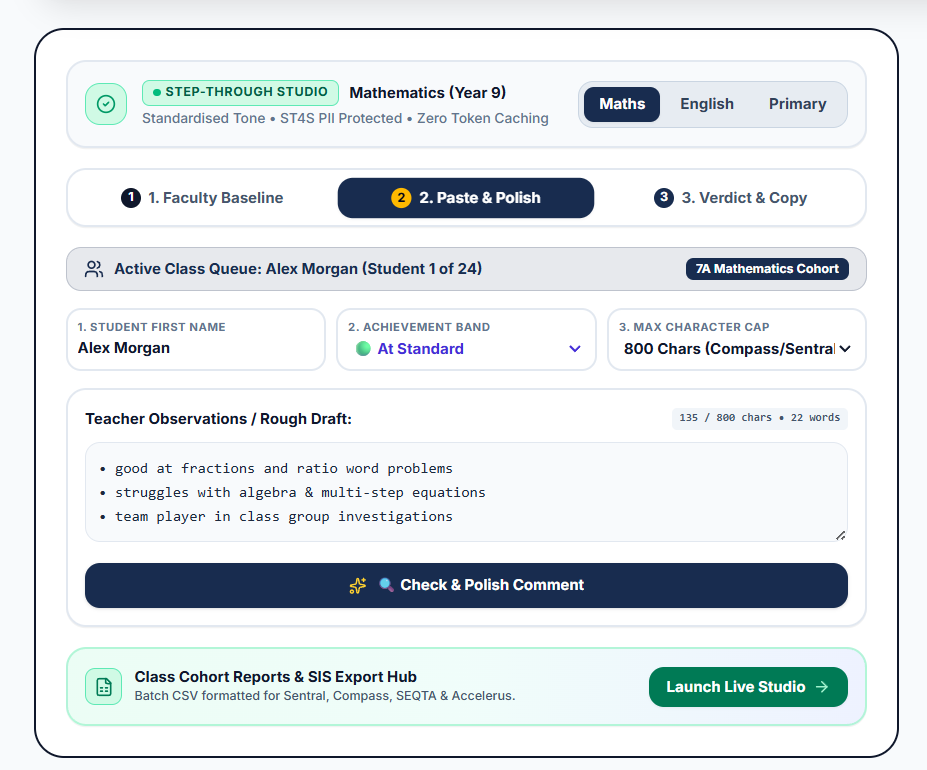
Inside Inkcraft Report
Experience the real teacher workflow: Step-through drafting, live deficit phrasing audit, curriculum calibration, and one-click SIS clipboard paste.
Standardised Tone • ST4S PII Protected • Zero Token Caching
Calibrate Your Faculty Reporting Tone
Choose an accredited state curriculum blueprint to calibrate sentence structure and vocabulary rigour.
Victorian Curriculum 2.0 - Year 9 Mathematics Standards
Tone: Commendatory & Constructive • Target: ~80 words • Tier 2 Academic Vocabulary
Enter raw teacher notes, dot points, or rough drafts. Inkcraft flags negative deficit phrasing and re-anchors them to constructive mastery goals.
"Applies index laws with positive integral indices to evaluate numerical expressions."
"Solves linear equations involving grouped terms and variables on both sides."
"Articulates mathematical reasoning systematically during peer investigations."
"Consolidate foundational algebraic rules when verifying multi-step linear proofs."
Audits against 100% Zero-Deficit standards & advances to Step 3 Verdict & Copy.
🟢 PASS: High Quality, Curriculum-Aligned & Constructive
Throughout this semester, Alex has shown consistent proficiency in solving linear equations, simplifying algebraic expressions, and interpreting index laws. In practical applications involving right-angled trigonometry and surface area calculations, Alex applies appropriate mathematical formulas with accuracy. During multi-step problem-solving investigations, Alex communicates mathematical reasoning clearly. For future growth, Alex should focus on verifying the reasonableness of answers and refining algebraic factorisation strategies when working with quadratic expressions.
Class Cohort Reports & SIS Paste Hub
Pre-formatted text and character counts for Sentral, Compass, SEQTA & Accelerus.
The 4 Pillars of Inkcraft Report Studio
Every feature is purpose-built to eliminate cognitive fatigue for educators while upholding rigorous institutional standards.
Zero-Deficit Transformation
Eliminates negative, punitive, or repetitive remarks. Automatically reformulates student weaknesses into empowering, curriculum-mapped forward targets.
Curriculum & Blueprint Calibration
Natively calibrated to Victorian Curriculum 2.0 (VCAA), NSW NESA and ACARA 9.0 ground-truth achievement standards. Independent and Catholic schools can configure custom faculty rubrics, progression scales, and comment formulas.
Batch Class List Queue
Paste whole class lists separated by line breaks. Student names, pronouns, and draft points are extracted automatically and audited in parallel.
1-Click SIS Clipboard Paste
Instant 1-click clipboard pasting mapped for Australian school reporting systems with zero re-formatting:
State Curriculum Blueprints & Custom Standards
Every student observation is anchored to official jurisdictional achievement descriptors, Tier 2 academic vocabulary, and your school's exact character limits.
Victorian Curriculum 2.0
Mapped to VCAA 2.0 standards. Replaces deficit remarks with active continuum progression verbs and positive next-step targets.
NSW Syllabus (NESA)
Calibrated for NSW outcomes. Embeds analytical rigor and textual evidence expectations for balanced, assessment-backed feedback.
ACARA 9.0 Standards
National curriculum alignment. Anchors observations to Foundation–Year 10 achievement bands with balanced, constructive guidance.
Custom School Standard
Your faculty house style. Enforces your school's unique 4-pillar sentence formulas and character limits to eliminate SIS truncation.
Test Blueprint Calibration in the Interactive Simulator
Switch between Victorian Curriculum 2.0, NESA, and ACARA standards live on this page to see how sentence structure, verb rigour, and word counts automatically adjust.
Beyond Spellcheck: Real-World Reporting Synergy
Inkcraft Report is not an isolated text editor. It bridges teacher observations with Australian curriculum standards and your school's existing SIS workflow, closing the loop between classroom practice and reporting.
Guided Scaffolding & Rapid Roster Stepping
Draft syllabus-aligned comments with zero blank-page fatigue or repetitive phrasing. Import class rosters, select achievement levels, and turn observations into polished text.
- Guided Scaffolding: Step through competencies, habits, and growth goals with zero prompt writing.
- Rapid Class Flow: Move through student rosters seamlessly with keyboard shortcuts.
- Rough Draft Polishing: Transform informal notes into parent-friendly prose in seconds.
Pedagogical Standards & Compliance Audit
Eliminate moderation bottlenecks and Sunday rewrites. The compliance engine flags deficit remarks, subjective bias, and repetitive wording before leadership review.
- Zero-Deficit Filter: Automatically turns negative phrasing into proactive next-step mastery goals.
- Syllabus Verb Audit: Enforces grade-appropriate progression verbs and objective evidence.
- Cohort Cadence Scanner: Detects overused words across the class so every comment sounds distinct.
Faculty Blueprint Calibration & SIS Paste
For Heads of Faculty. Set approved school tone benchmarks and character limits across teams before 1-click clipboard paste into Compass, Sentral, SEQTA, or Accelerus.
- Exemplar Calibration: Upload approved faculty samples to lock tone, length, and format.
- Quality Assurance: Ensure comments match department expectations at generation time.
- 1-Click SIS Paste: Pre-calibrated clipboard copying mapped to your school's student management system character counts.
Built from the Ground Up for Australian Student Privacy
Aligned with the stringent requirements of the Safer Technologies 4 Schools (ST4S) framework and the Australian Privacy Act 1988.
In-Memory PII Firewall
Student names and personal identifiers are sanitised in-memory before processing. No raw student profiles are stored or indexed.
Zero Public LLM Training
Teacher observations, grades, and school remarks are never retained or utilised to train public artificial intelligence models.
Australian Data Residency
All infrastructure and encrypted databases reside exclusively in Australian data centres, protected by TLS 1.3 and AES-256 encryption.
Engineered for Head of Faculty Workflows. Validated Against Victorian Standards.
How Inkcraft Report is structured to eliminate late-night reporting bottlenecks, enforce zero-deficit language, and ensure character-perfect pasting into Compass, Sentral, and SEQTA.
Dissolving the Faculty Moderation Bottleneck
Heads of Department and Assistant Principals often spend entire weekends proofreading faculty batches to rewrite punitive language, rebalance comment structures, and enforce character counts. Inkcraft Report standardises tone and verifies curriculum codes across the entire department before comments ever reach leadership review.
Authentic Teacher Voice Without Cognitive Drain
Teachers input brief, genuine observations regarding a student’s demonstrated evidence and growth. Inkcraft expands these inputs into dignified, strengths-based prose mapped to official Victorian Curriculum 2.0 or ACARA v9 achievement standards — preserving authentic educator voice while reclaiming valuable planning time.
Transparent School Licensing
Individual teacher passes from $99/yr and faculty moderation packs from $750/yr • Department & State PO Ready.
Built for Teacher Well-Being & Classroom Reality
How Inkcraft Report solves the real frustrations of school reporting season — eliminating evening burnout, re-framing deficit remarks for leadership sign-off, and preserving your authentic voice.
How much time will Inkcraft Report actually save me during report writing week?
Most Australian educators spend between 20 to 45 hours drafting, revising, and character-counting comments every reporting cycle. Inkcraft Report cuts that time by over 75%.
Instead of staring at a blank cursor trying to find five different ways to phrase the same milestone, you simply enter your raw assessment observations or bullet points. The engine instantly synthesises a balanced, curriculum-aligned comment adhering to your faculty's word-count limits in seconds.
Will the comments sound like me, or will they read like generic, robotic AI?
They read authentically like you. Unlike generic chatbots that invent flowery adjectives or produce repetitive sentence openers, Inkcraft Report is anchored directly to your chosen Faculty Baseline Exemplar.
The engine calibrates to your faculty's specific syntactic rhythm, sentence complexity, and academic vocabulary tier (e.g. Victorian Curriculum 2.0 commendatory voice). Parents and school leadership will recognise your authentic teaching voice and genuine observations.
How does the "Zero-Deficit" engine stop my comments from getting rejected by leadership?
Having comments sent back by your Year Level Coordinator or Principal for "deficit phrasing" late on Sunday night is deeply demoralising. Phrases like "struggles with fractions" or "does not focus during discussions" immediately trigger moderation flags.
Inkcraft Report's built-in Australian moderation filter flags deficit language automatically and transforms it into positive, actionable next steps (e.g. "Next semester, [Student] will benefit from targeted practice decomposing fractions to strengthen multi-step problem solving"). Your comments pass leadership review on the very first submission.
Is this safe to use under Australian school privacy policies and AI guidelines?
Yes, 100% compliant and privacy-safe. State education departments and independent school boards strictly ban feeding student personal information into consumer AI platforms like ChatGPT.
Inkcraft Report uses an innovative Client-Side PII Stripping Firewall. Before any text leaves your computer, student names and identifiers are stripped locally in your browser and replaced with neutral tokens. The external model only ever processes anonymous curriculum statements. The student's name is re-inserted only after the text returns to your device. No student personal information is ever logged, stored, or used to train AI models.
Do I need to install any software or learn a complicated new system?
No downloads, no browser extensions, and zero training required. Inkcraft Report runs entirely in your standard web browser.
Whether you are working on your school-issued laptop in your staffroom or finishing comments at home on the weekend, you simply open the page, enter your notes, and copy the polished comment with a single click directly into your school's reporting system (Sentral, Compass, SEQTA, Accelerus, or Excel).
How easily can I switch between different subjects or year levels?
Seamlessly. Whether you are a primary teacher covering Mathematics, English, and Inquiry, or a secondary teacher with Year 7 Humanities and Year 10 Advanced Science, you can switch subjects and year bands with a single click.
Each mode immediately updates its active pedagogical verbs (e.g. solves, factorises, evaluates, synthesises) and curriculum achievement benchmarks to match that exact learning area.
Want to see the transformation with your own notes?
Try the live 3-stage simulator at the top of this page with zero login required.
Need formative diagnostic assessments as well?
Explore Inkcraft Studio, our separate curriculum-calibrated diagnostic testing platform featuring item heatmaps and timed Victorian Curriculum 2.0 simulations.